SharingWidgetsReference
Widget types and options
Every widget type, chart, panel and option the widget builder offers — layouts, columns, windows, themes, accents and limits.
Every kind of widget, every chart a widget can show, and every option the builder offers. The tables are read from the same configuration the builder and the published widget use.
Widget types#
| Widget | Shows | Comes from |
|---|---|---|
| Bill list | Bills, as cards or a table | A saved view of bills |
| Single bill | One bill, with the panels you choose | One record you pick |
| Event list | Hearings and sessions, as a schedule, week or month | A saved view of calendar |
| Single event | One hearing or session | One record you pick |
| Official list | Legislators, as cards or a table | A saved view of officials |
| Single official | One legislator, with the panels you choose | One record you pick |
| Chart | One of the dashboard's charts | A saved view |
| Session status | Where a legislature's session stands | A legislature |
| Scorecard | A legislator scorecard | A scorecard |
Charts#
A chart widget shows one chart from the Bill or Legislator dashboard, scoped by a saved view. A saved view of bills offers the charts its own Dashboard shows. A view of one jurisdiction offers that jurisdiction's charts: its committees, its fastest-moving bills and the analysis. A view of several jurisdictions, of All, or a list offers the map of bills by state, bills updated each month, and the two pies. Jurisdictions says which a chart fits. A chart marked in Analysis is CapitolMath's own analysis, which only a plan that includes it can show; Most similar bills compares bills across states, so it isn't available on a plan that covers one state.
| Chart | Reads | Jurisdictions | Analysis |
|---|---|---|---|
| Bills by outcome | Bills | Any | — |
| Bills by furthest stage | Bills | Any | — |
| Bills by state (map) | Bills | Several, All or a list | — |
| Bills updated each month | Bills | Several, All or a list | — |
| Lower chamber committees | Bills | One jurisdiction | — |
| Senate committees | Bills | One jurisdiction | — |
| Fastest-moving legislation | Bills | One jurisdiction | — |
| Most similar bills | Bills | One jurisdiction | ✓ |
| Bicameral companion bills | Bills | One jurisdiction | ✓ |
| Political spectrum — social vs economic | Bills | One jurisdiction | ✓ |
| Bipartisan support by topic | Bills | One jurisdiction | ✓ |
| Lower chamber seating | Officials | Any | — |
| Senate seating | Officials | Any | — |
| Districts by party (map) | Officials | Any | — |
| Distribution by tenure | Officials | Any | — |
| Most successful primary sponsors | Officials | Any | ✓ |
| Most successful cosponsors | Officials | Any | ✓ |
| Break with their party most | Officials | Any | ✓ |
| Distribution by social score | Officials | Any | ✓ |
| Distribution by economic score | Officials | Any | ✓ |
Panels#
A Single bill or Single official widget shows the panels you tick. Panels marked Paid need a plan that includes CapitolMath's analysis. If your plan stops including it, a paid panel a widget already shows stays in its settings and shows one line saying why; saving the widget keeps it, and it's yours to remove.
| Single bill panel | Shows |
|---|---|
| Summary (always) | Number, title, jurisdiction, chamber of origin, status and the last action. |
| Sponsors | Primary sponsors and co-sponsors, with party. |
| Bill history | The most recent actions, newest first. |
| Prior vote results | Recorded roll calls, with the tally. |
| Political lean (Paid) | Where the bill sits on the economic and social axes, 1 (conservative) to 5 (liberal). |
| Whip count (Paid) | The projected yes / no / uncertain count for the bill's next floor vote, with the model's accuracy. Shown only while a floor vote is still ahead. See Whip counts. |
Link to the official text adds the legislature's page for the bill, with the current version, its date and how many versions there are. The text itself never embeds.
| Single official panel | Shows | For |
|---|---|---|
| Bio (always) | Name, office, party, district or state, time in office, committees. | Everyone |
| Contact information | Office address and phone — never an email address. | Everyone |
| Official web page | A link to the official's own page. | Everyone |
| External references | Ballotpedia, Follow the Money and VoteSmart, as links. | Everyone |
| Legislative record links | Links to the bills they sponsored and voted for or against. | Legislators |
| Signing history | Bills signed, vetoed and allowed to become law unsigned. | Governors and presidents |
| Sponsor effectiveness (Paid) | Bills passed of bills sponsored, with the count behind it. | Legislators |
| Votes against party (Paid) | Share of party-line votes cast against their party, with the count behind it. | Legislators |
A panel that can't apply to the official you chose isn't offered.
List options#
| Option | Choices |
|---|---|
| Layout | Auto (a table when the widget is at least 640 pixels wide, cards when it isn't), Cards or Table. |
| Table columns — bills | Status, Last action, Jurisdiction, Session, Chamber of origin, Primary sponsor, Outcome. The bill and title always show. |
| Table columns — officials | Office, Party, District, Years in office, Leadership. The name always shows. |
| Bills shown, Officials shown, Meetings shown | 5 to 50; 10 to start. The rest are a click away: "View all on CapitolMath". |
Cards show a fixed set of fields, so table columns don't apply to them.
Our position#
A bill list can show your organization's position on each bill, and can be narrowed to the bills where you hold certain positions: an association's "Bills we're watching" page, or "Bills we oppose".
- Show our public position adds an Our position column to the table, and a line to each card, using your organization's names for the positions.
- Only bills where our public position is keeps the bills where your position is one of those checked. With none checked, the widget shows every bill in the saved view.
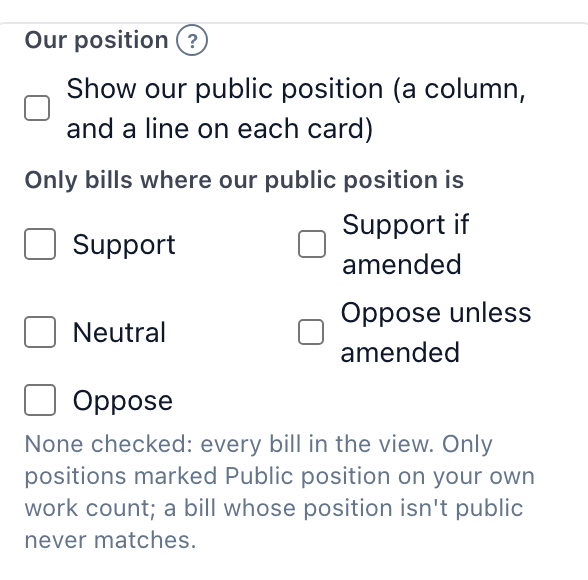
Only a position marked Public position on the tracked item ever appears (only the person who first set it, or an Owner or Admin, can mark it; see Who can make a position public), and only on your own work, never a client's. The widget reads positions with its owner's access, so it shows only items shared with them, never what Read All would add. A bill whose position isn't public shows a dash, and never matches the position filter.
A position made private, or a bill that stops being tracked, leaves the widget within 5 minutes, when it's next refreshed. If positions are turned off for your organization, or your plan no longer includes public positions (State and up), or the widget's owner leaves, the widget shows no positions, and a list narrowed by position shows no bills until that changes.
Event options#
| Option | Choices |
|---|---|
| Layout | Auto (a month grid when the widget is wide, a week grid in a column, a schedule on a phone), Schedule, Week or Month. |
| Window | The saved view's own, or Next 7, 30 or 90 days, Past 7 or 30 days, or All dates — always relative to today, so the widget never goes stale. |
| Time shown first | The reader's or The chamber's. The other clock is shown beside it whenever the two differ. |
| Subscribe link (webcal and .ics) | An event list's link for adding its meetings to a calendar app. |
| Add-to-calendar buttons | A single event's buttons for adding it to a calendar. |
Appearance#
Every widget has these.
| Option | Choices |
|---|---|
| Heading | Up to 80 characters. Left empty, it's the saved view's name, the chart's name, or the record's own. |
| Subheading | An optional line under the heading, up to 160 characters. |
| Show your logo beside the heading | The logo from Organization → Profile. Replacing it there updates every widget that shows it. |
| Theme | Auto follows each viewer's light or dark setting, not yours. Or Light, or Dark. |
| Accent | Navy, Green, Brick, Plum or Ink — or any color you pick. |
| Width | Fill the space the widget is placed in, or At most 520px. |
| Density | Comfortable or Compact. |