ScorecardsBuilding a scorecardHow to
Scope: legislature, session and chambers
Choose where a scorecard's bills come from, its legislature and session, the chambers it can score, and who is scored.
Applies toEditor licensePartial coverage
The Scope step decides what a scorecard covers: one legislature, one session, the chambers to score and who in them is scored. It's also where the scorecard gets its name and its sharing.
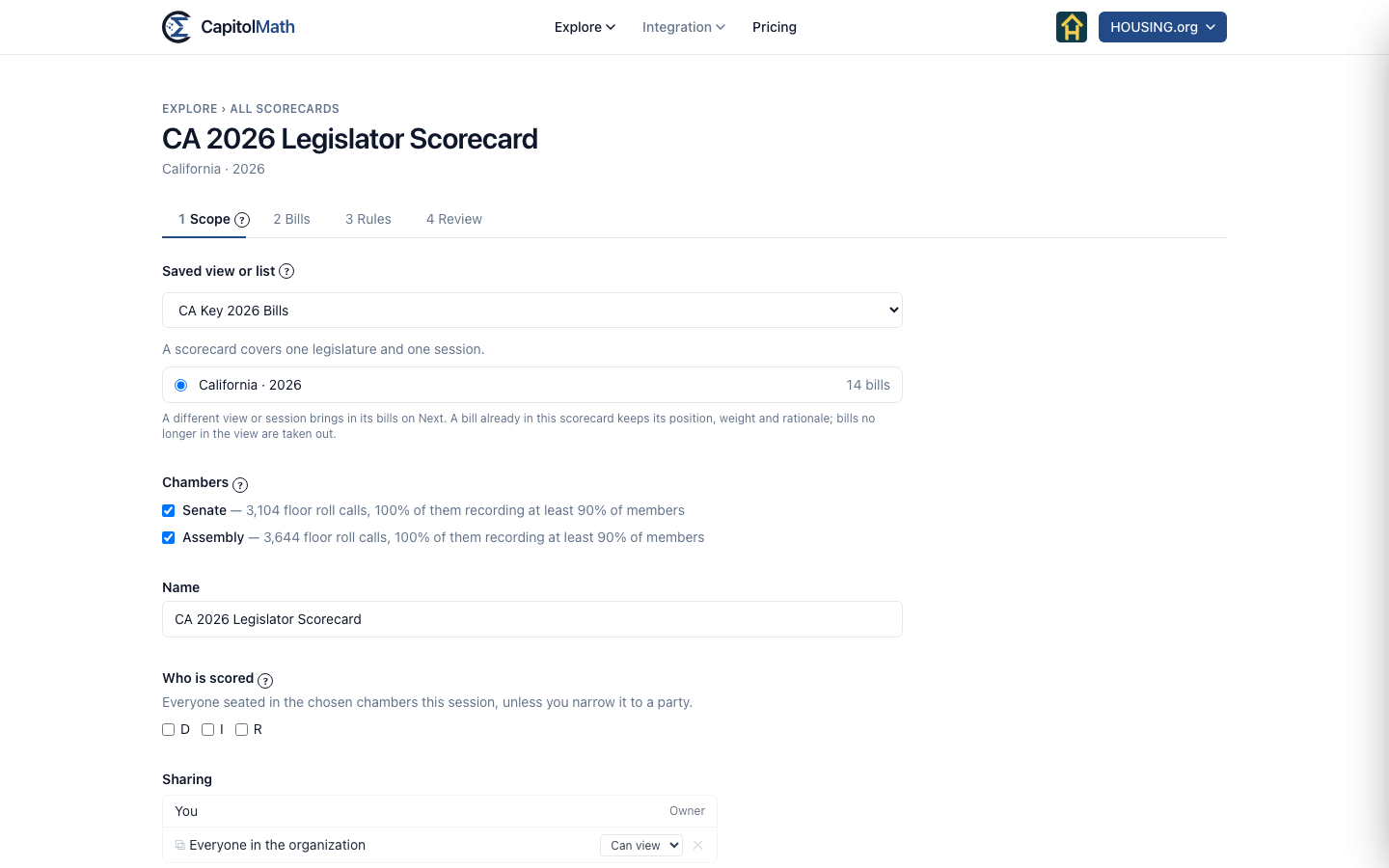
Start from a saved view or a list#
The quickest start is the bills you already track. Choose From a saved view or list, then pick one under Saved view or list. Your lists and the bills you watch (Bills I watch, Watching a bill) are offered alongside your saved views.
-
Choose the view or list. CapitolMath reads which legislatures and sessions its bills span, with the number of bills in each.
-
Choose one legislature and session. A scorecard covers exactly one; if the view spans several, start another scorecard for the next. Any your plan doesn't cover show Not in your plan.
-
Select Next. The bills come in on the Bills step, each set to Support and a standard weight, ready for your positions.
The bills are copied in. Changing the saved view later won't change the scorecard, so a bill added to the view next month doesn't quietly enter your scores. A scorecard holds up to 200 bills; a view with more in that session is refused, with the count, so choose a narrower view or a list of the bills you mean to score.
Reuse earlier rules#
Choose Reuse earlier rules to score a new session the way you scored an old one. Under Reuse the rules from, pick an earlier scorecard. Its rule for missing votes, its minimum, its party narrowing and its display options come with it; its bills don't. Pick the Legislature and Session, then add this session's bills on the Bills step.
Start from a client's tracked bills#
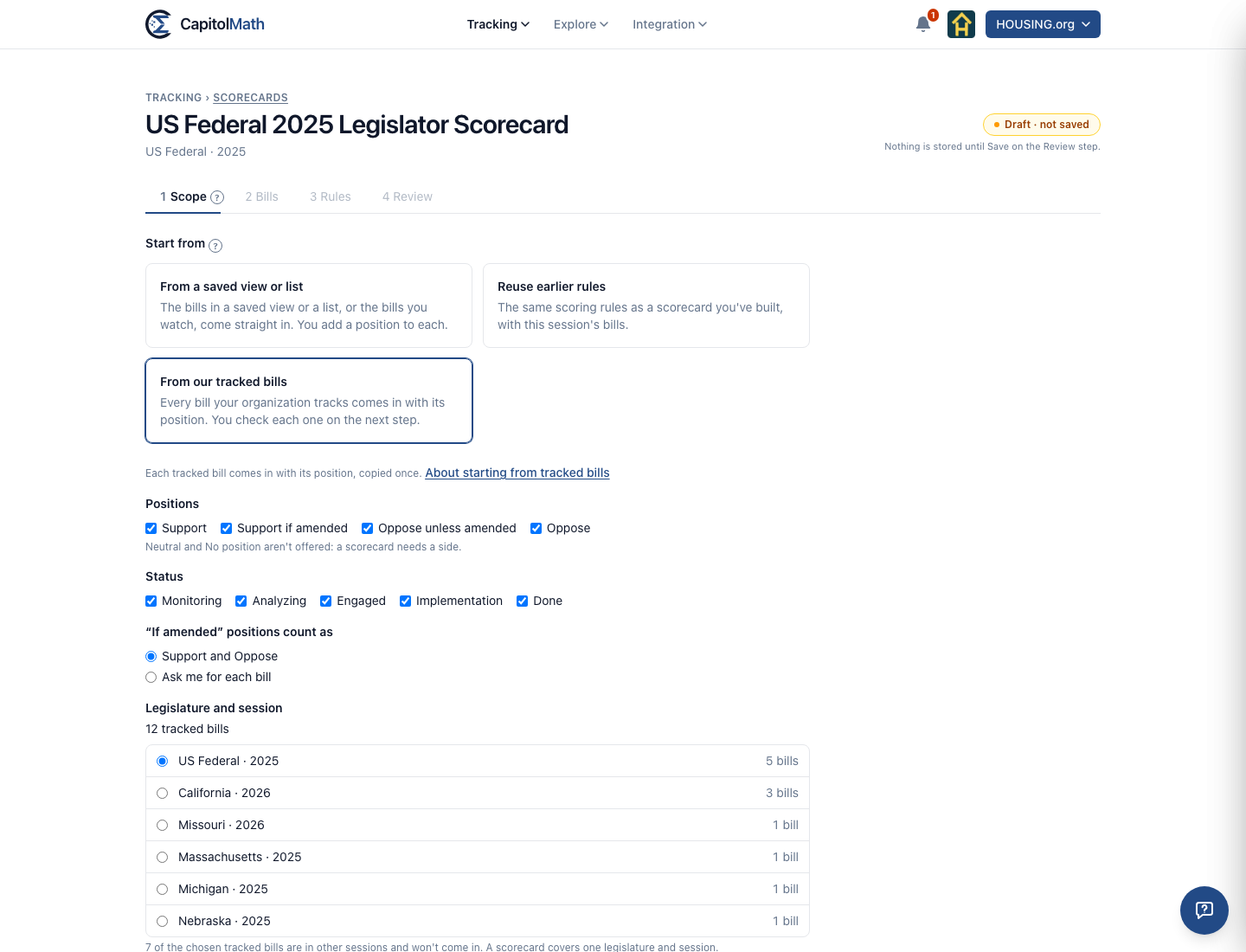
If your organization tracks bills and takes positions on them, choose From a client's tracked bills. With clients turned off, it reads From our tracked bills. Every bill tracked for one client comes in with its position.
- Client: the clients you can see, or Our own work. A scorecard for a client belongs to it. The client's page lists it, its name says so, and it starts shared the way the client's records are.
- Positions: Support, Support if amended, Oppose unless amended and Oppose, all checked. Neutral and No position aren't offered, because a scorecard needs a side.
- Status: every status, Done included, since scorecards are mostly made when a session ends.
- "If amended" positions count as: Support and Oppose by default. Or choose Ask me for each bill, which marks each one Decide on the Bills step.
- Legislature and session: the one holding most of the chosen bills. A scorecard covers one, so bills in other sessions don't come in, and the step says how many.
On the Bills step, each bill shows the tracked position it came from. The positions are copied once. They're the scorecard's own after that: changing a tracked bill never changes the scorecard. Publishing the scorecard publishes them, even where the tracked bill's position isn't marked public. That's your decision when you publish, and the publish confirmation repeats it. This start is hidden when positions are turned off.
It holds only its source's bills. A scorecard started this way holds only bills tracked for that client, or for your own work, that you can see. A bill added on the Bills step later must be one of them too, and the step says so. Who sees it at first: a client's scorecard starts shared the way the client's records are. One for your own work starts shared with you only if any of its bills is tracked for fewer people than the whole team; share it wider once it's made. A client's scorecard stays behind the client wall: only people who can see that client can find it, open it or put it in a widget, or see, preview, publish or update a widget that shows it, whatever else they may manage.
Which chambers can be scored#
Under Chambers, each chamber shows how many floor roll calls it recorded that session and what share of them record at least 90% of its members. Every chamber that can be scored starts ticked; untick one to score the other alone.
A chamber is offered only when its votes are recorded member by member: at least 10 floor roll calls that session, and at least 90% of them recording at least 90% of the chamber's seats. Some chambers leave absent members out of a roll call instead of marking them absent. Scoring those would make every absence vanish, so no rule for missing votes could apply, and the scores would look right while resting on the wrong total. A chamber below the bar shows can't be scored with the reason; it isn't offered with a warning. See Coverage.
Name, who is scored, and sharing#
- Name. Suggested from the view or list, or as "Legislature Session Legislator Scorecard". A name is unique in the organization.
- Who is scored. Everyone seated in the chosen chambers that session, unless you tick one or more parties. Party is each member's current party.
- Sharing. A new scorecard is shared with Everyone in the organization, who Can view it. Change it as you would for a saved view; see Sharing and access.
Changing the scope later#
When you edit a scorecard, you can choose a different saved view or session on the Scope step. Its bills come in when you select Next. A bill already in the scorecard keeps its position, weight and rationale; bills no longer in the view are taken out.