UsingBillsConcept
About the bill list
What the Legislation page shows when it opens, cards and table, choosing All jurisdictions, and what the filter counts mean.
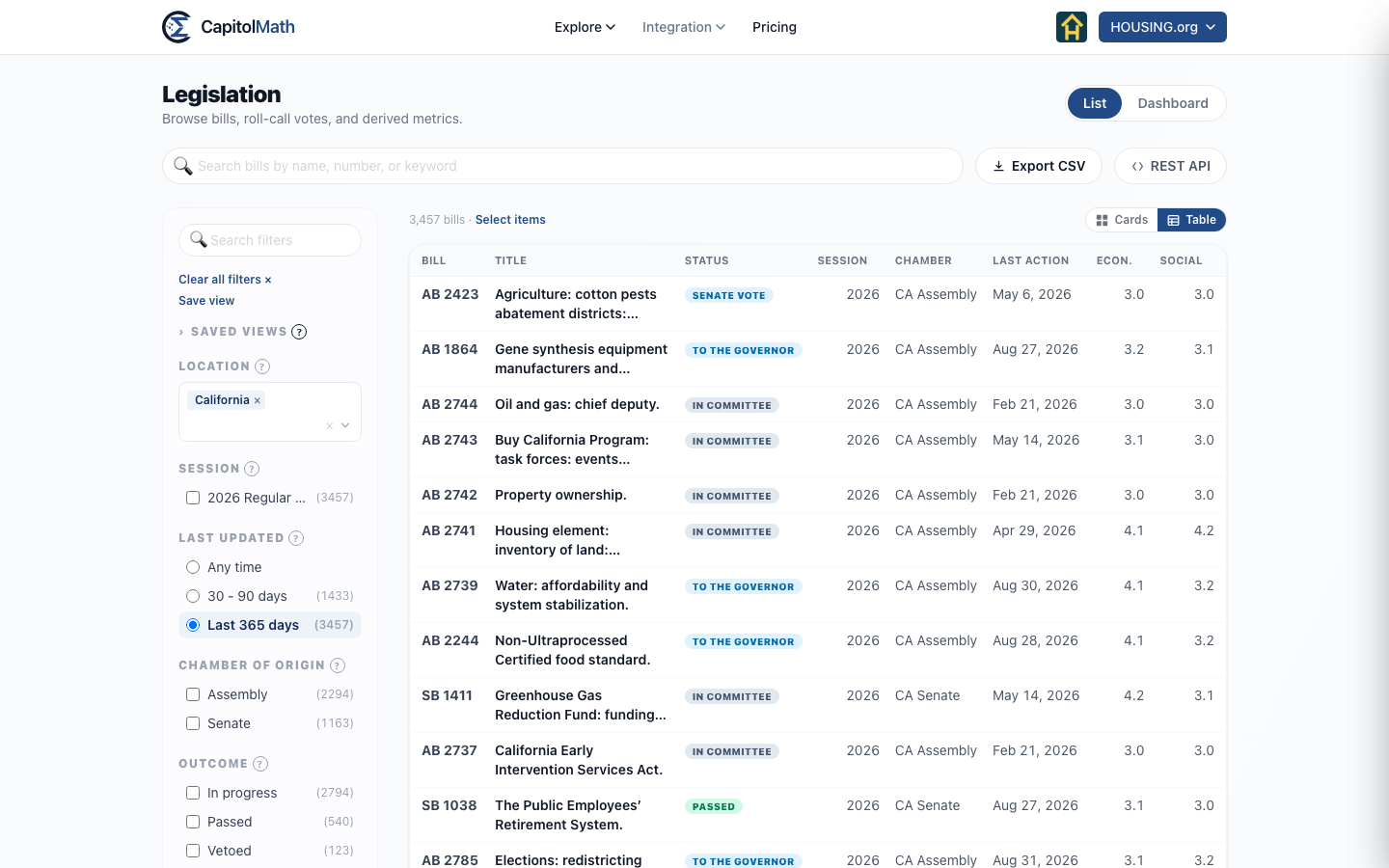
Legislation lists the bills in any state or in Congress, narrowed by the filters down its left side and the search box across the top. Choose a bill to read it in a panel that slides in over the list.
What it shows when you open it#
The list opens on the jurisdiction you last looked at — on this page or on Elected Officials — or on California the first time. Two filters start switched on, because together they answer the question most people arrive with — what's live:
- Type is set to Bill. Resolutions are a large share of what a legislature files and a small share of what anyone is looking for; tick Resolution to include them.
- Last updated is set to Last 365 days — bills that moved in the past year.
The line above the list says how many bills match. The newest session comes first, 50 bills at a time; choose Show more at the bottom for the next 50.
Cards and table#
Use Cards and Table above the list to switch between them.
- A card shows the bill's status chip, its number and jurisdiction, its title, its key words, and its chamber and session. Hover over a long title to read all of it.
- The table has a row per bill with Bill, Title, Status, Jurisdiction, Session, Chamber, Last action, and the economic and social lean scores. Choose a column heading to sort by it; choose it again to reverse. Jurisdiction appears only when more than one is selected, and the lean columns only where your plan includes political lean.
The status chip is the same on both: what became of the bill if it has stopped, otherwise how far it has got. Status and outcome labels lists every chip.
All jurisdictions#
The Jurisdiction filter lists every state and Congress (as US Federal, first), each with its number of bills. Choose several to see their bills together, or choose All for every jurisdiction at once.
All can't be combined with named jurisdictions — choosing it clears them, and choosing a named one clears it. With All or several jurisdictions, the filters are the ones that compare across jurisdictions — Bills like, Last updated, Chamber of Origin, Outcome, Furthest Stage, Topic and the leans. Session, Currently with and Type are for one jurisdiction at a time, and choosing a second place clears them. See Bill facets.
Facet counts#
The number beside each filter option is how many bills you'd see if you chose it, given every other filter you've set — but not the other options in its own group. So ticking Passed under Outcome changes the counts under Furthest Stage and Topic, while the other Outcome counts stay put, ready for you to add one.
Two things to know:
- The counts don't take the search box into account. The total above the list does.
- An option with no bills is hidden, unless you've already chosen it. Outcome is the exception: it always shows all four, because "Vetoed (0)" is information — that state doesn't record vetoes — where a missing row would read as "no vetoes happened".
List and Dashboard#
List and Dashboard at the top right show the same bills two ways. The Dashboard charts them — by outcome, by furthest stage, by topic and more — and choosing part of a chart lists those bills. With more than one jurisdiction chosen, or All, it shows a map, Bills by state — each state shaded by how many of the bills it holds, darker for more, and an enlarged D.C. at the right standing for Congress's bills — then Bills updated each month, how many had a recorded action in each of the last twelve months, then the two charts that compare across legislatures: Bills by outcome and Bills by furthest stage. Here, choosing part of a chart sets the matching filter and shows the list: a state on the map sets Jurisdiction to it, a month's column shows the bills with an action in that month, and a slice sets Outcome or Furthest Stage. A link above the list — for example ← Bills by state — takes you back to the Dashboard as it was, filters and all, at the chart you chose; so does Dashboard. While Last updated is set, places with no dated action history yet are hatched on the map — Last updated can't find their bills, which isn't the same as no activity. The filters and the search apply to both.
The map zooms like a district map: + and − at its top left zoom in and out, the arrows beside them move it, and Reset shows the whole country again. With a mouse you can also drag it. Zoomed in, a click moves the map, so double-click a state to list its bills.