UsingCalendarConcept
About the calendar
What the calendar shows — Schedule, Week and Month, coverage, time zones — and how your legislation and saved views narrow it.
Applies toPartial coverage
The calendar shows what legislatures have scheduled — hearings, markups, floor sessions and the dates sessions end — not what has already happened. Use it to see when the bills you follow are being heard. Open it from Explore → Calendar.
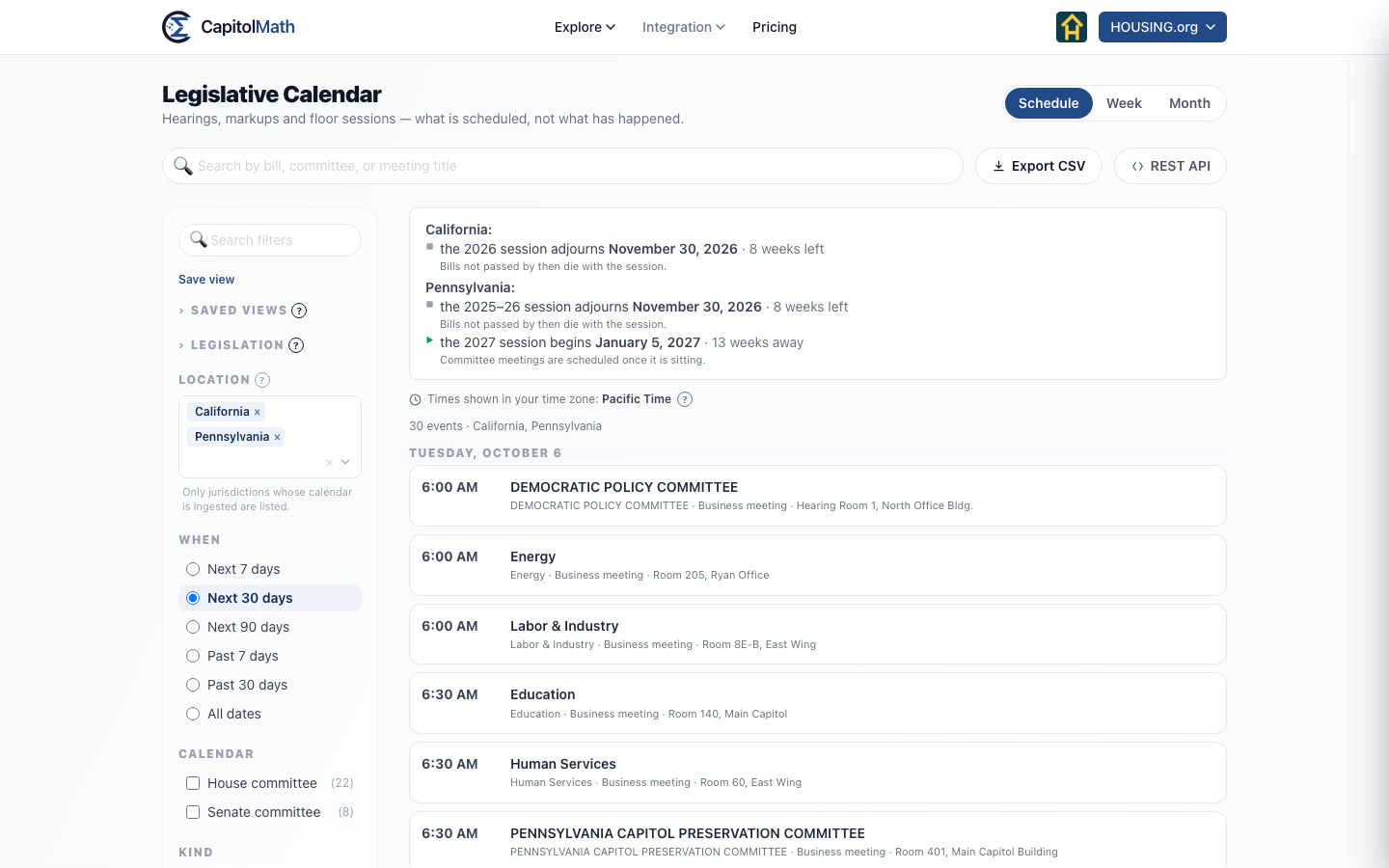
Three views#
The buttons at the top right switch between three readings of the same meetings:
- Schedule — a list, day by day, answering "what's next?" The When filter sets its range, from Next 7 days to All dates; Next 30 days is the default.
- Week — a grid of one week, for seeing which days are packed and what collides at 10 a.m. Up to three meetings at one hour sit side by side; beyond that, a count opens the whole day under the grid.
- Month — a month at a glance. A day's +N more opens that week.
In Week and Month, Today and the ‹ › buttons replace the When filter. The view and date are part of the page's address, so a link you send opens on the same week.
What a meeting shows#
Each row gives the time, title, committee, kind of meeting and room, with how many bills are on the agenda. A badge marks a meeting that's canceled, postponed, rescheduled or held.
Select a meeting to open it beside the list: when and where, the committee, the Official notice ↗, and the Bills on the agenda, each of which opens the bill. Add to calendar copies the meeting to Google Calendar, Outlook, Yahoo or any app that reads an .ics file.
Narrow the list with Jurisdiction, Calendar, Kind and Agenda (Has bills or No bills), or the search box, which matches a meeting's title, its committee, and the number or title of any bill on its agenda.
Above the list, a line per jurisdiction says when its session adjourns and how long is left, or when the next one begins — bills that haven't passed by adjournment die with the session.
Coverage#
Choose one or more jurisdictions under Jurisdiction, or All for every one at once. All stands alone: choosing it clears the others, and choosing a jurisdiction clears it. With All, the session deadlines above the list are left out — there would be one per legislature.
Committee agendas are carried for some legislatures, not all. For the rest, the calendar holds session dates only, and the page says so: "Only session dates are recorded for…" — or, across many jurisdictions, which of them have agendas. The line "Events as of…" says when the calendar was last fetched; calendars are fetched on demand, not continuously. See Coverage for what each jurisdiction has, and Why is the calendar empty? for the other reasons a week can look quiet.
Meetings without a time#
Some notices give a date but no clock time — "Upon call of the Chair". Those meetings are listed as All day rather than at midnight, in the All day band at the top of the week grid. Where the notice gave a phrase like that, it's kept under From the notice.
Time zones#
Every time on the calendar is in your time zone — your browser's — and the page names it ("Times shown in your time zone: Eastern Time"). A 10:00 hearing in Washington and a 10:00 hearing in Sacramento land three hours apart, so two meetings on one row really are at the same moment. When you're elsewhere, the meeting's panel also gives the time in the room. All-day entries are dates, so they fall on the same day wherever you are.
Meetings for your legislation#
Signed in, the Legislation Views filter lists your saved views of bills, lists among them. Choose one or more to see only the meetings whose agendas include their bills — several views together mean a bill from any of them.
Choosing views fills Jurisdiction with the places they cover: the jurisdictions a view names, or for a list, wherever its bills are. You can take any of them out again, and the calendar keeps to the ones you leave.
Saved views of the calendar#
The calendar has saved views of its own, like Legislation and Elected Officials. Set the filters — Legislation, Jurisdiction, When, Calendar, Kind, Agenda and the search — then choose Save view at the top of the filters. The view is listed under Saved views, can be shared, and can feed an event-list widget or a webhook. See Creating and editing a saved view.