UsingBillsReference
Bill facets
Every filter on the Legislation page — Jurisdiction, Tracked, Bills like, Session, Last updated, Outcome, Furthest Stage, Currently with and more — and its rules.
Every filter group on Legislation, in the order the page shows them, with its options and the rules behind them. Within a group, the options you tick are alternatives; across groups, a bill must match every group you've used. For how the counts work, see About the bill list.
Saved views#
Signed-in readers only, and closed until you open it. None, then your lists (Bills I watch first) and saved searches. Choosing one replaces every filter with the ones it holds. See About saved views.
Jurisdiction#
Every state, and Congress as US Federal, each with its number of bills; or All. All can't be combined with named jurisdictions.
With All or more than one jurisdiction chosen, the filters are the ones that compare across jurisdictions: Bills like, Last updated, Chamber of Origin, Outcome, Furthest Stage, Topic and the two leans. Session, Currently with and Type are for one jurisdiction at a time: choosing a second place clears them, and a saved view or link that holds them ignores them across jurisdictions. Without Type, resolutions are listed along with bills.
Tracked#
Signed in, with Read on Tracked items: Any, Tracked by us or Not tracked, each with its count. Tracked by us is the bills your organization tracks that you can see — the same ones Tracked items lists — so two colleagues with different sharing can see different counts. It saves with a view, and the view shows each person their own organization's tracked bills. Widgets and other public pages can't use a view that holds it.
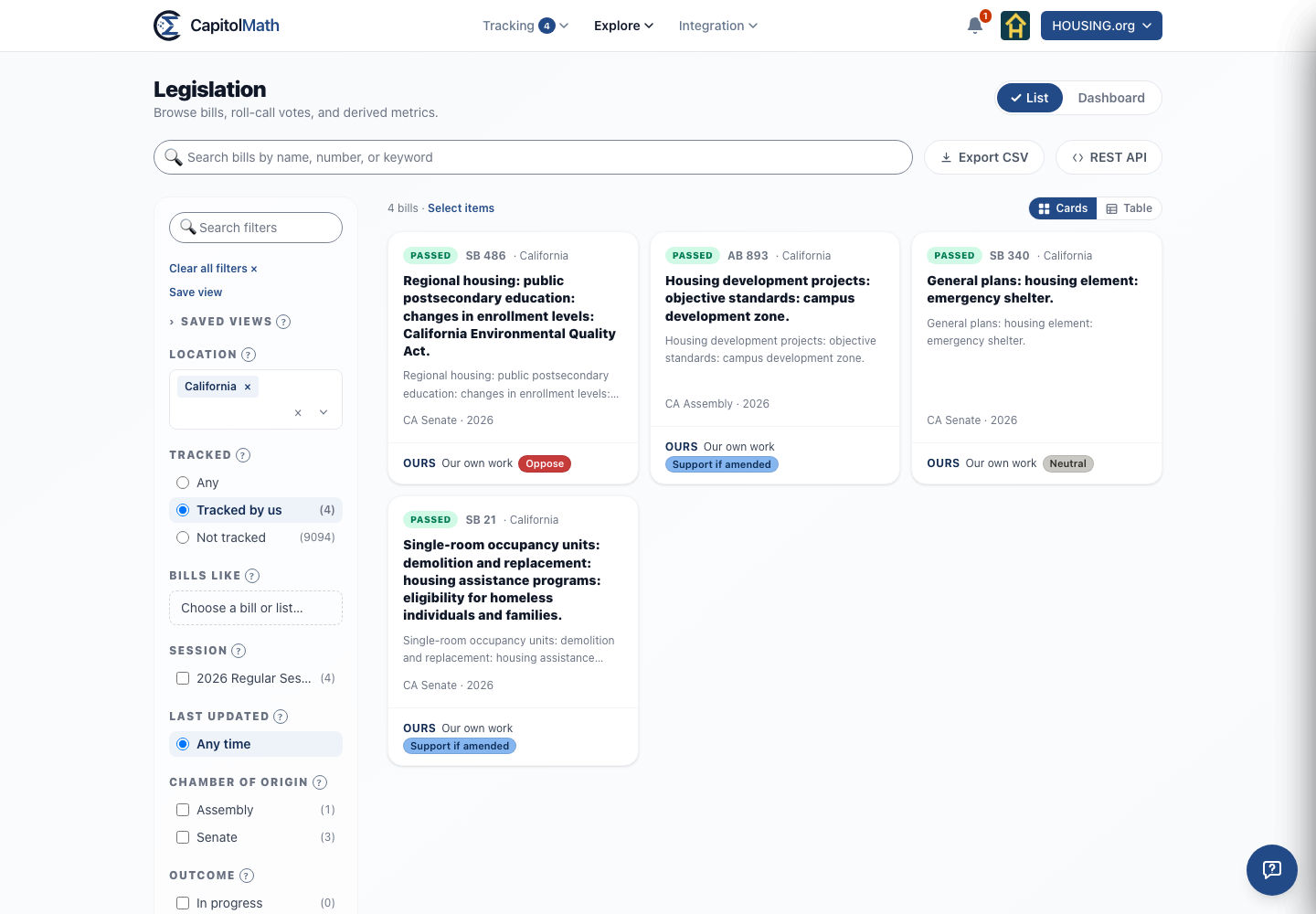
Each tracked bill's card and table row carries an Ours line: whose work it is (Our own work) and your position on it. Select it to open the tracked item.
Bills like#
The bills in your chosen jurisdictions that are like one bill, or like the bills in one of your lists — from any jurisdiction. Choose Choose a bill or list…, then either search for a bill (by number or words from its title, everywhere or in one place) or pick a list of up to 20 bills. With California chosen and a Pennsylvania bill as the start, you see the California bills like it; with All and a list, every bill in the country like the ones on it. The bill or bills you start from are left out.
A bill counts as like another when its text is nearly the same — model legislation, as a bill's Similar bills shows — or when its title or summary shares the other's distinctive words. The other filters then narrow what's found.
A saved view keeps the list, not the bills in it: add to the list and the view finds bills like the new ones too. If the list has grown past 20 bills, applying the view says so instead of showing results — remove some bills from the list, or choose a smaller one. Comparing bills across states is analysis included in some plans, not the free plan or a one-state plan. See Plans and what they include.
Session#
The sessions of the chosen jurisdictions, named as the legislature names them (2026 Regular Session, for example). Special sessions are listed on their own. Two-year sessions are labeled by the year they end, so California's 2025–2026 session is 2026. Session not recorded holds bills that can't be placed in a session.
Last updated#
How recently the bill last moved, by the date of the most recent event in its history. One option at a time.
| Option | Bills whose last event was |
|---|---|
| Any time | any time — and bills with no recorded event |
| Last 7 days | in the past 7 days |
| 7 - 14 days | 7 to 14 days ago |
| 14 - 30 days | 14 to 30 days ago |
| 30 - 90 days | 30 to 90 days ago |
| Last 365 days | in the past year — this includes the four above. The page starts with it chosen |
It works only for jurisdictions whose full action history CapitolMath has rebuilt. Elsewhere bills have no update date, so any option but Any time leaves them out; the page says so when that empties the list, with a button to show them all.
An older link or saved view may show > 90 days, an option no longer offered; it goes on filtering as it did.
Chamber of Origin#
The chamber the bill was introduced in: the lower house — named as the state names it (Assembly, House of Delegates, or House), or House/Asm with several jurisdictions chosen — Senate, or Legislature for Nebraska's single chamber.
Outcome#
What became of the bill, as distinct from how far it got. The options overlap — a vetoed bill in a session that has ended is also dead — so their counts don't add up to the total. All four always show, even at zero.
| Outcome | Means |
|---|---|
| In progress | |
| Passed | |
| Vetoed | Recorded by some states only |
| Dead | Session adjourned (or passed its scheduled end) without passage |
A bill awaiting the governor's signature when the session ends stays In progress for 90 days after adjournment — governors can act after a session closes — and counts as Dead after that. A session whose end date isn't recorded has no Dead bills. Status and outcome labels has the full rules.
Takes effect#
When enacted bills take effect, for the jurisdictions with effective dates (see Effective dates). One option at a time, starting on Any.
| Option | Bills with an effective date |
|---|---|
| Any | no filter — bills without a date included |
| Last 30, 90 or 365 days | from that many days ago through today, most recent first |
| Next 30 or 90 days | after today, through that many days ahead, soonest first |
| This year | from January 1 through December 31 |
| Custom range… | between two dates you choose |
- Today counts as past. A law taking effect today has taken effect, so it's under the Last options.
- Any date can match. A bill with several effective dates matches if one falls in the range, and the table's Takes effect column shows that date.
- Ranges roll. A saved view keeps the option, not the dates, so Next 30 days is always the next 30 days. A custom range keeps its two dates.
- Undated bills (Contingent or Unresolved) appear only under Any. Choosing a range says how many it left out.
Takes Effect Basis#
How each date was reached: Published, Stated, Derived, Contingent or Unresolved (see How sure the date is). It combines with Takes effect: Derived with Next 90 days lists the coming dates counted from an event or a default rule. It starts collapsed; it opens when a view or link has one chosen.
Furthest Stage#
The furthest step the bill reached — a high-water mark, not its latest action. A bill that reached a floor vote and was later sent back to committee still reads as having reached the floor.
| Option | The bill reached |
|---|---|
| Introduced | introduction, and no further |
| In Committee | a committee |
| Assembly Vote, House Vote… | the lower chamber's floor — the chamber it's on the floor of, not where it started |
| Senate Vote | the Senate floor |
| Floor Vote | a floor, where the chamber can't be told, and in Nebraska |
| Reconciliation | reconciling the two chambers' versions |
| To the Governor | the governor (the President, for Congress). Reaching the desk isn't being signed — that's an Outcome |
| Veto Override | a vote to override a veto |
Currently with#
Who holds the bill now: the committee it's in, the floor it's on (Senate floor, Assembly floor and so on), or Governor / Executive once it has left the legislature. Committees are grouped by chamber. Where CapitolMath knows a subcommittee's parent, the subcommittee's bills count toward the parent. Use Search committees to find one.
Topic#
Subjects assigned from the words in the bill's title and summary. A bill can have several; one that matches none is Other. The topics are Taxes, Budget, Affordability, Crime, Immigration, AI, Climate, Housing, Healthcare, Agriculture, Mining and Drilling, Traffic, Wages, Education, Elections, Defense, Foreign Policy, Government, Finance, Public Lands, Technology, Civil Rights and Other.
Type#
Bill or Resolution. The page starts with Bill only; tick both to see everything. One jurisdiction at a time: with All or several, Type is off and both are listed.
Economic lean and Social lean#
Two sliders from 1 (Conservative) to 5 (Liberal), in steps of 0.1. Narrowing one leaves out bills with no score on that axis. They need a plan that includes political lean for every jurisdiction chosen. See Political lean scoring.