UsingOfficialsHow to
Finding your representatives by address
Narrow a legislator scorecard to the legislators who represent an address, or find a district's member on Elected Officials.
A legislator scorecard can be narrowed to the legislators who represent one address: your own, or a member's, a donor's, a chapter office's. You'll see the state senator and representative for that address (or its members of Congress, on a federal scorecard), with the grades they earned.
Look up an address#
-
Signed in, open a scorecard: Tracking → Scorecards, then choose one from the list. It lists the scorecards in your organization that you can see.
-
On the Legislators tab, find the Find my legislators box beside the tabs, to the left of Filters.
-
Start typing a street address. After a few letters it suggests full addresses in the scorecard's state; on a federal scorecard, any U.S. address works.
-
Choose the address from the list. Use the arrow keys and Enter, or click it.
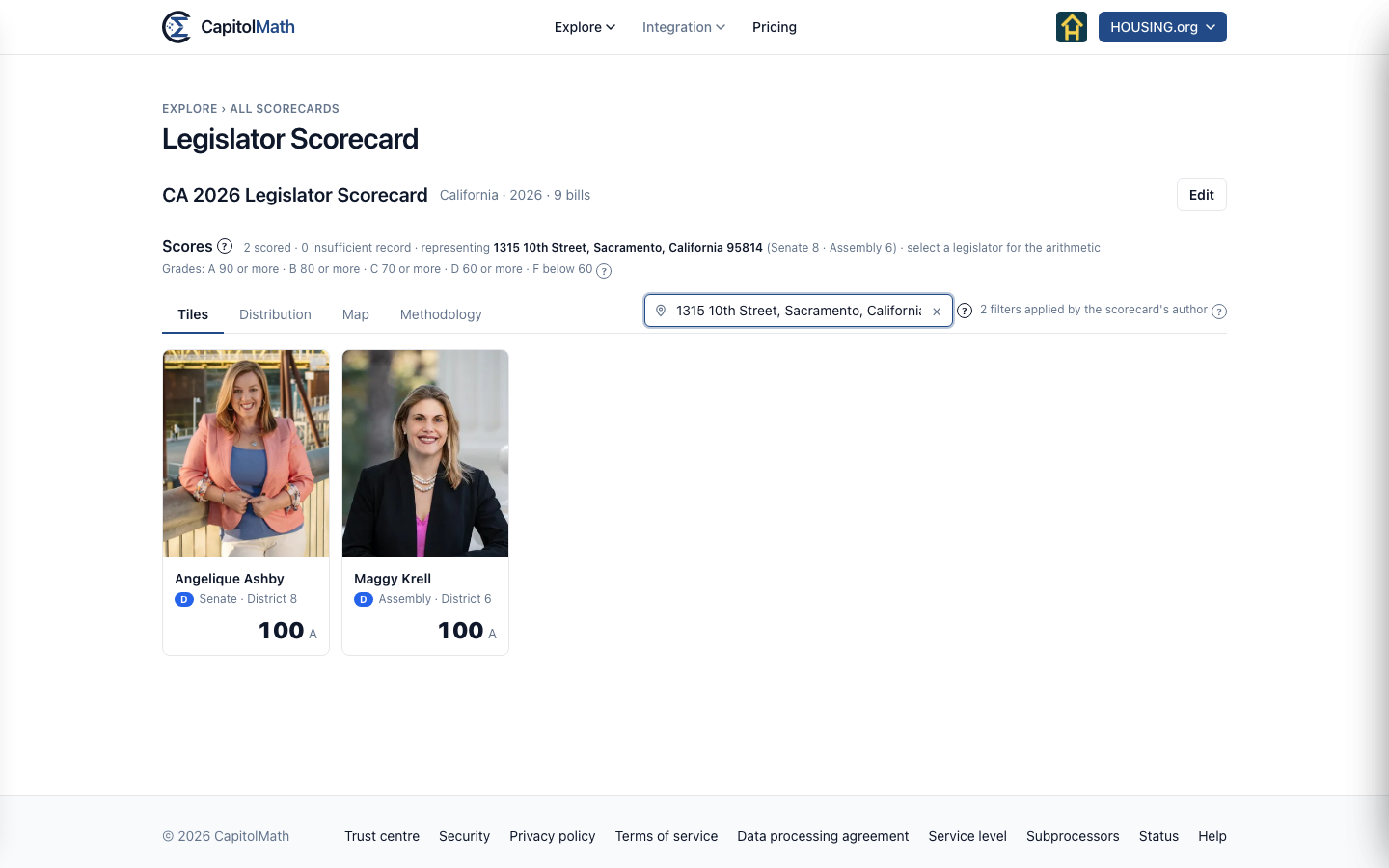
The results narrow to the legislators who represent that address, and the line above them says representing, the address, and its districts: the state senate and house or assembly districts, or the congressional district on a federal scorecard. Choose a legislator to see how their score was worked out. The address stays applied as you move between tabs that list legislators, and works alongside Filters.
To go back to every legislator, select × at the end of the address box.
What to know#
- Choose from the list. Only a suggested address can be looked up, so a typo can't land on the wrong street. If yours isn't suggested, keep typing: add the city, or check the spelling.
- The session's own district lines. Districts come from the U.S. Census Bureau's maps, for the lines the session's legislators were elected on: a 2025 or 2026 session uses the lines of the 2024 election, even if the state has redrawn them since. A senator elected earlier, on older lines, is matched by the district number they hold now.
- Not every session. The Census Bureau has maps for the lines of the 2012, 2016, 2018, 2022, 2024 and 2026 elections, and for the 111th, 113th, 115th, 116th, 118th, 119th and 120th Congresses. For a session elected on other lines, such as a 2021 or 2022 session elected in 2020, Find my legislators isn't offered.
- Only for you, and not kept. The address isn't saved with the scorecard, nobody else sees it, and CapitolMath doesn't store it. To suggest addresses, what you type is sent to Mapbox, an address service; the chosen address's map point, not the address, goes to the Census Bureau. Both are sent from CapitolMath's servers. See Subprocessors.
- Only where the author allows it. Find my legislators is a display option of its own; a scorecard's author can turn it off. See Display options.
The same lookup appears on scorecard widgets published on other websites, when the scorecard lets viewers filter. See Scorecards on your website.
On Elected Officials#
On Elected Officials, choose the state, then search for the district — an office reads like "Assembly Member, District 66", so District 66 finds that seat (and District 660, if there is one). On the Dashboard, the Districts by party map shows every district; choose one to open its member's profile.