TrackingTracked itemsConcept
Unread changes
On the items you own or watch, see what changed since you last opened each one: the bell, What changed, Unread activity filters, and marking items read or unread.
On the tracked items you own or watch, CapitolMath keeps track of what changed since you last opened each one, the way an inbox keeps track of unread mail. A busy session moves hundreds of bills; unread tells you which of yours moved, and how.
Which items can be unread#
Only the items you own or watch are followed for unread, plus any item where someone mentioned you in a note. Every other tracked item stays plain, however much changes on it, so the signal means something on a long list. You start caught up: when you become an item's owner or start watching it, only what changes from then on is unread.
What counts as a change#
- Stage: a legislative action on the bill, including amendments and outcomes.
- Vote: a recorded floor or committee vote.
- Hearing: a hearing on the bill scheduled, moved or canceled.
- Note: someone else wrote or edited a note on the item.
- Mention: someone mentioned you in a note on it. A mention makes the item unread for you even if you don't own or watch it, until you open it.
- Task: someone else added, changed, completed or canceled a task on the item.
- A field, by its name: someone else changed the item's Position, Priority, Status, Owner or Tags.
Stage, vote and hearing changes belong to the bill, so they show on every tracked item for it. Changes you make yourself never count: if you were caught up, your own edit leaves the item read.
In the legislatures listed in Amendments, an amendment to the bill offered or decided is an Amendment change, which also belongs to the bill. What changed names each amendment, who offered it and what became of it. Once an item has one, Amendments joins the kinds under Unread activity. Amendments CapitolMath records from a legislature's earlier sessions never make an item unread.
Seeing what's unread on Tracked items#
- The count above the results says how many of the items shown are unread.
- On cards, a bell sits before the status. It's filled when someone else changed the item since you last opened it and outlined when nothing has. Select it for What changed: every change since you last looked, newest first, each tagged with its kind, with what it was and is now, who made it and when.
- In the table, unread rows are tinted, with a bar at the left and the bill's number and name in bold. Under the name, a chip for each kind of change opens just those changes.
- The Updated column shows when the item or its bill last changed. Select its header to sort by it.
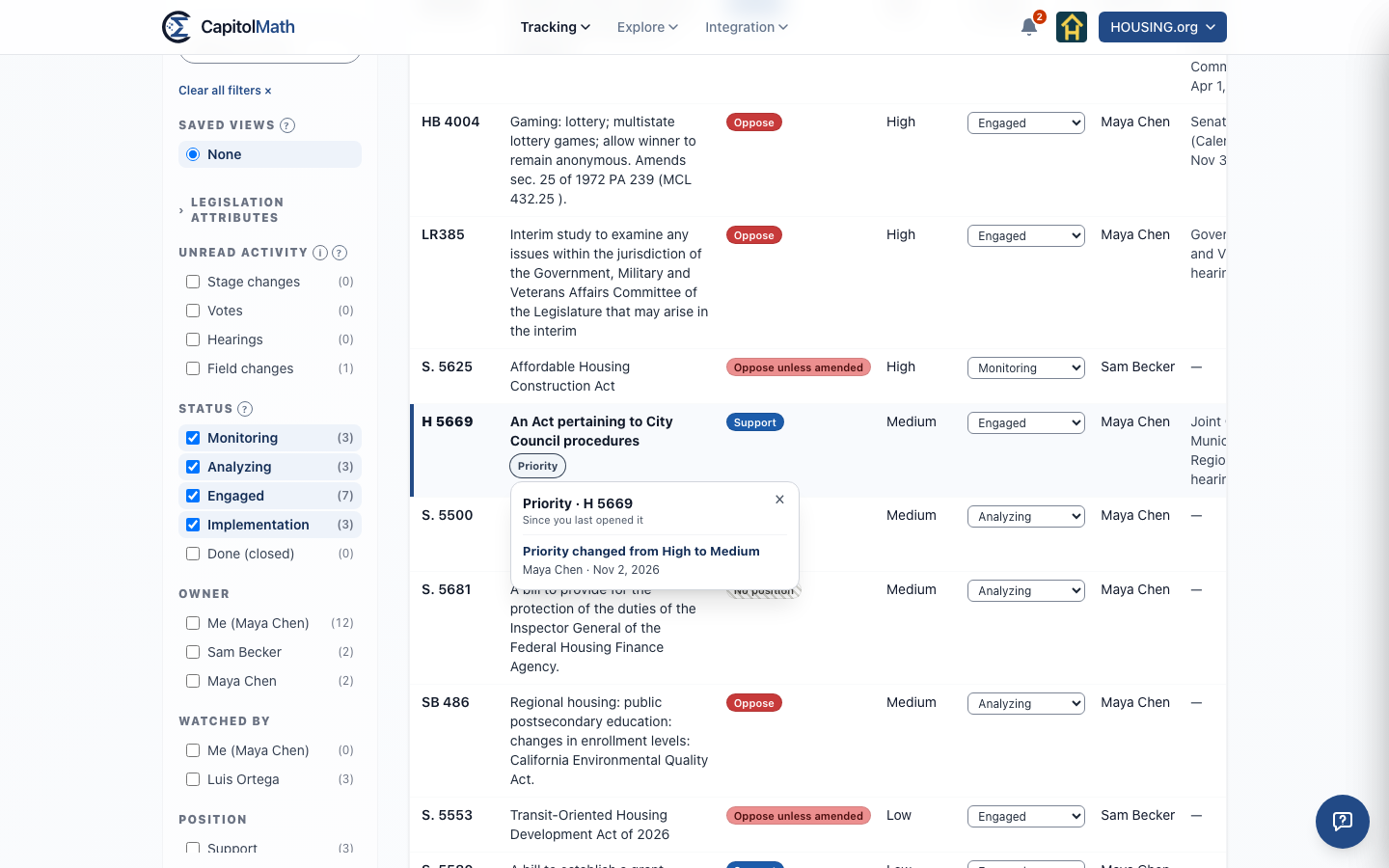
Close What changed with its ×, Escape or a click anywhere else. Reading it doesn't mark the item read.
On My work#
My work's My bills lists the open items you own or watch, unread first, with the same chips. It also lists bills you watch that your organization doesn't track, marked Not tracked: they're followed the same way, from when you started watching, with Stage, Vote and Hearing chips only, since nobody here has an item on them to change. Opening one of those bills, from any page, marks it read, and its dot marks it read or unread.
Finding unread items#
Under Unread activity on the left, check a kind (Stage changes, Votes, Hearings, Notes, Mentions of me or Field changes) to list the items you own or watch with unread changes of that kind. Check several to list items with any of them. Each count is how many items checking that box would show, with your other filters as they are. Unread activity saves with your Tracked items views, and a view shows each person their own unread items.
Marking read and unread#
- Opening an item marks it read, from any page.
- At the foot of What changed, Mark as read marks it read without opening it, and Mark as unread brings it back. An item you mark unread with nothing new shows its most recent changes again until you open it.
- With items selected, Mark as read and Mark as unread in the selection bar apply to the ones you own or watch, and say how many others were left alone.
For client members: Moved since your last visit#
A client member doesn't own or watch items, so instead each of their client's items they've opened is marked Moved since your last visit when something they can see changes: a note marked For the client, the position, the status and tags when you show them to clients, a custom field shown to clients, or the bill's own stage, votes and hearings. Changes they can't see never count, not even in the Updated date they see, so a note kept to your team, a priority or an owner never shows up as "something happened". Their own notes never mark an item for them, and what one client member has opened is theirs alone. See Clients.
Your read state is yours#
What you've opened and marked is yours alone: no one else in your organization sees it, and it never changes what's unread for them. It's in your organization's data download only when you download it yourself, and it goes when you stop following an item or leave the organization.