TrackingTracked itemsHow to
Officials, committees and hearings
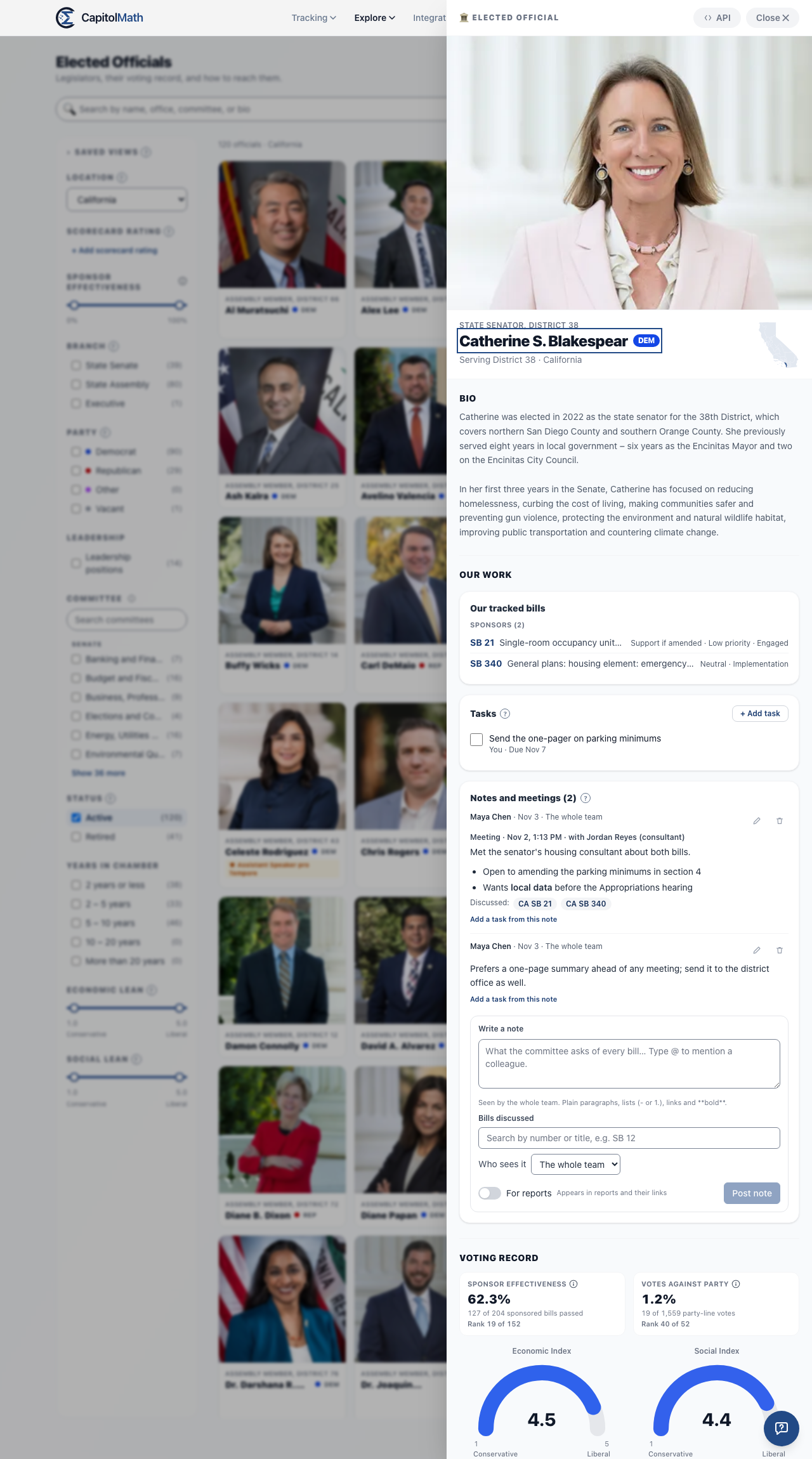
Our work on an official, committee or hearing: the tracked bills it touches, tasks, and notes kept to the team, a group or only you, each linking the bills discussed.
Your organization's work doesn't stop at bills. What the senator's chief of staff said in the hallway, what the committee chair asks of every bill, what to bring to Thursday's hearing: each has a home on the official's, committee's or hearing's own panel, under Our work.
What Our work shows#
Open an official from Elected officials, a committee from Committees, or a hearing from the Calendar. Under Our work you'll find:
| On | Our work holds |
|---|---|
| An official (a legislator, governor or other statewide official) | Log a meeting under the header; Our work with the official: a Votes with figure for your positions and a Tracked bills count, then the tracked bills they sponsor, will hear in committee (now, or on one of its upcoming agendas), or will act on next (a floor vote in their chamber, or, for a governor, their signature); Tasks; and the Meeting log, your notes and meetings with them. |
| A committee | Our tracked bills in it now or on one of its upcoming agendas; its Upcoming hearings, each with how many of your bills are on the agenda; its Open tasks; and Notes on the committee itself: what outlasts one meeting. |
| A hearing | Under Bills on the agenda, each bill you track shows Ours: with its position, priority and status. Then Tasks due on this hearing (tasks on the hearing, and tasks on your tracked bills that follow it); the hearing's own Notes; and What we know about the committee, so whoever prepares for the hearing reads both. |
Only the bills your organization tracks, and that you can see, are listed. On an official, only open tracked items count: one in a closed status, such as Done, leaves their lists. A bill left in committee or on the floor when its session adjourned leaves Will hear in committee and the floor list, unless it's on an upcoming agenda; a former member keeps the bills they sponsored. Selecting one opens it on Tracked items.
An official's panel#
On an official's panel, your organization's work comes first, between the header and the public record: the actions, Our work with the official, Tasks and the Meeting log, then the bio, voting record, committees and contact information as before. Each part appears only for members whose permissions allow it, and shows only your organization's work:
- Log a meeting needs Create on Notes for Elected officials.
- Our work with the official needs Read on Tracked items, and appears once at least one tracked bill you can see is one they sponsor, will hear in committee or will vote on. Each Votes with figure counts the official's final-passage floor votes, this session and last, on bills where a client (or your organization) holds a Support or Oppose position, and how many matched it; a governor's counts signatures and vetoes. There's one for each client, up to three, then one for your own positions, and only items you can see count. If you belong to more than one organization, its name is above the heading.
- Tasks needs Read on Tasks and a Full license, and appears once there's an open task on the official, or when you can add one.
- The Meeting log needs Read on Notes for Elected officials, and lists only the notes you may read. With no notes yet, it appears only to members who can write one.
Client members see only their own client's bills, positions and votes, and the notes kept to their client's group, and never the actions, tasks or your team's meeting briefs.
Finding officials by your tracked bills#
To find whom to meet across a whole legislature, use Tracked bills on Elected officials: Sponsor, Will hear in committee and Will vote on are the same three lists as each official's Our work, computed the same way, so the roster and the panel always agree. See Tracked bills.
Meetings with your bills on the Calendar#
On the Calendar, the Agenda filter has Our tracked bills: only the meetings with a bill you track on the agenda. Each meeting in the list says how many of your bills it holds (2 of ours).
Who sees a note#
A note on a tracked bill follows the bill's sharing. A note on an official, committee or hearing has its own audience, chosen when you write it:
- The whole team: everyone in your organization except client members. This is where most notes belong, and it's your organization's default unless an Owner or Admin changed it in Organization › Defaults.
- A group: only the members of a group you're in, such as Housing team.
- Only me: only you. Members granted Read All on that kind of note (Owners and Admins, to start with) can ask to read it, under Show them; each time they do, it's recorded in the audit log, and the note shows you who read it and when.
Each note says who sees it beside its author. You can change who sees your own note by editing it; no one else can.
A note's attached files have the same audience as the note, and change when it does: keep a note to a group and only the group can open its files. A Read All holder opens an Only me note's file only as a Read All read, recorded and shown to you. See Attaching files.
Notes for a client#
With clients on, a note is For your own work or one client, chosen beside Who sees it. A note for a client can be kept to the team, a group or you, as any note, or to the client's name and our team: that client's client members, and everyone in your organization who can see the client. A note for a client is read only by people who can see that client; one walled off for its account team stays with them (and anyone with Read All). While a client is archived or deleted, its notes are read by no one.
Client members read only their own client's notes kept to the client's name and our team, and their own. They never see a note kept to the team, a group or its author, your own work's notes, or another client's. They can write notes here too: theirs always belong to their client, are kept to the client's name and our team, and are marked from the client. Only they edit them; someone with Manage All can delete one. See Clients.
To write down a meeting, especially from your phone, use Log a meeting at the top of Our work: see Logging a meeting.
Writing a note#
- Open the official, committee or hearing, and go to Our work.
- Under Notes, write in Write a note. Plain paragraphs, lists, links and bold work, up to 20,000 characters.
- Under Bills discussed, search by number or title (SB 12, or words of its title) and choose each bill. Your tracked bills come first. Linking a bill never tracks it.
- With clients on, choose who it's For: your own work or a client. Choose Who sees it, and turn on For reports if the note may appear in reports.
- To attach files, choose Attach files. They're scanned for malware before anyone can open them, and never go into a report.
- Choose Post note.
A note shows on each bill it discussed: in the bill's panel on Legislation, under its Tracking list, as From our meetings and notes, to the same people who can read the note. Search our notes too on Tracked items finds a tracked bill through a note that discussed it.
Mentions, editing and deleting#
Type @ to mention a colleague. The list offers only people who can read the note with the audience and client you chose, so a mention never shows a note to anyone else; a note kept to you can't mention anyone. A client member can be mentioned only in a note kept to their own client and our team. Each person mentioned is told, in the app and by email to start with, with the official's, committee's or hearing's name and who wrote it, never the note's text.
The small pencil and trash icons appear on your own notes, and, for members with Manage All on that kind of note, on everyone's. Every earlier version is kept, and when someone else edits or deletes your note you're told. See Notes and mentions for the rest.
When a member leaves the organization, their notes kept to the team or a group stay, credited to them. Their Only me notes can't be read by anyone, and are erased 30 days later unless they're restored to the organization first.
Tasks on officials, committees and hearings#
Choose + Add task under Tasks: what, who it's assigned to (a team member with a Full license), and a due date. On a hearing, or a committee with a hearing coming up, a task can instead be due a number of days before the hearing, and moves with it if the hearing moves. Add a task from this note starts one from a note, as Follow up: ….
Every team member who reads tasks sees tasks on officials, committees and hearings: they're about the public record, which everyone sees. They appear on Tasks (search finds them by the official's or committee's name), in My work, and in the morning's due and overdue notifications, like any task. See Tasks.